Reading Emails
Emails are rendered as styled Markdown in the terminal using glamour. The reader supports vim-style navigation.
Navigation
| Key | Action |
|---|---|
j / k | scroll line by line |
space / d | page down / up |
gg | jump to top of email |
G | jump to bottom of email |
h / q / esc | back to inbox |
Opening Emails Externally
| Key | Action |
|---|---|
e | open in $EDITOR (read-only) — search, copy, vim motions |
o | open in w3m (terminal browser, clickable links) |
O | open in $BROWSER (GUI browser, images rendered) |
ctrl+o | open newsletter web version in $BROWSER (from List-Post header) |
Images
Remote images appear as [Image: alt] placeholders, keeping the reading experience clean and fast. To see images, press O to open in your browser.
Inline / attached images (e.g. screenshots pasted into an email) are listed in the reader header: Attach: [1] screenshot.png [2] report.pdf. Press 1–9 to download to ~/Downloads/ and open with xdg-open. Inline images also show [Image: filename.png] placeholders at their position in the body text.
When you press O to open in the browser, inline images are extracted from the email and saved to temp files. The HTML cid: references are rewritten to file:// paths so the browser renders them — including images sent by other people (not just your own).
Links
Links in emails are automatically numbered inline where they appear in the body. A link like Check out our blog renders as Check out our blog [1] in the terminal.
Press space then a digit (1–9, 0 for 10th) to open the link in $BROWSER.
- Up to 10 links per email, deduplicated by URL
- Numbers appear inline so you can see them while reading without scrolling
- If an email has no links,
spaceworks as page-down as usual
Attachments
Attachments are listed in the reader header:
Attach: [1] report.pdf [2] photo.pngPress 1–9 to download attachment N to ~/Downloads/ and open it with xdg-open. Filenames are deduplicated automatically if a file already exists.
Threaded Inbox
Related emails are automatically grouped together in the inbox list. Threads are detected using a hybrid approach:
- Message-ID / In-Reply-To headers — proper RFC 2822 threading chain
- Subject + participant fallback — emails with the same normalized subject (stripped of
Re:,Fwd:, etc.) and overlapping participants (From/To) are grouped together
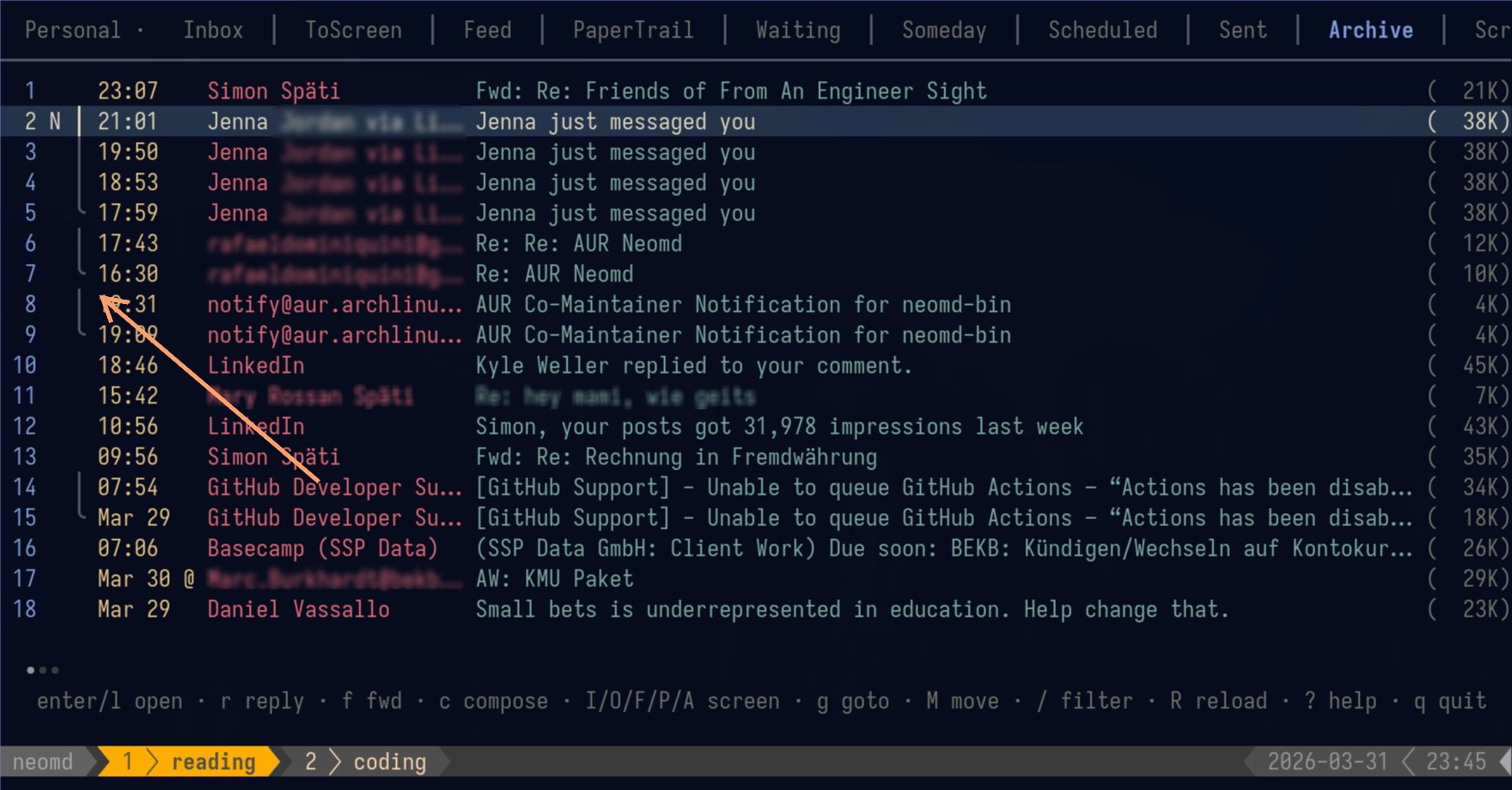
Threads display with a Twitter-style vertical connector line:
  1  ·17:43  │ rafaelxxxxxxxxxxx@g…  Re: Re: AUR Neomd              (12K)
  2  ·16:30 ·╰  rafaelxxxxxxxxxxx@g…  Re: AUR Neomd                  (10K)
  3 N 19:50  │ Bla blabla   via Li…  Jenna just messaged you        (38K)
  4 N 18:53  │ Bla blabla   via Li…  Jenna just messaged you        (38K)
  5 N 17:59  ╰ Bla blabla   via Li…  Jenna just messaged you        (38K)
  6   18:46    LinkedIn              tom Weller replied to ...      (45K)
7 ·14:22 · Simon Späti Data pipeline question (5K)·reply indicator — you’ve replied to this email (IMAP\Answeredflag, works across clients)·╰reply indicator within a thread│connects thread members (newest on top)╰marks the root/oldest email at the bottom of each thread- Non-threaded emails show no connector (clean, no visual noise)
- Threads are sorted by their most recent email, so active conversations float to the top
Or as image:
Replying, Forwarding, and Drafts
| Key | Action |
|---|---|
r | reply to sender |
ctrl+r | reply-all (sender + all CC recipients) |
f | forward email |
T | show full conversation thread across folders |
E | continue draft (only in Drafts folder) — re-opens as editable compose |
Conversation View
Press T from the inbox list or while reading an email to see the full conversation across folders. neomd searches Inbox, Sent, Archive, Waiting, and other configured folders for related emails — matching by normalized subject and participant overlap.
Results display in a temporary “Thread” tab:
- Each email shows
[Folder]prefix (e.g.[Sent],[Inbox],[Archive]) - Threading connectors (
│/╰) show the conversation structure - Press Enter to read any email, Esc to return to previous view
Also available as :thread (alias :t) from the command line.
Reply Indicator
Emails you’ve replied to show a · dot in the inbox list. This uses the standard IMAP \Answered flag, so it works across clients — if you reply from webmail, neomd shows it too.