Configuration Reference
On first run, neomd creates ~/.config/neomd/config.toml with placeholders.
Full example
[[accounts]]
name     = "Personal"
imap     = "imap.example.com:993"   # :993 = TLS, :143 = STARTTLS
smtp     = "smtp.example.com:587"   # :587 = STARTTLS, :465 = TLS
user     = "me@example.com"
password = "app-password"
from     = "Me <me@example.com>"
starttls = false                    # optional: force STARTTLS (see TLS/STARTTLS section below)
tls_cert_file = ""                  # optional PEM cert/CA for self-signed local bridges

# OAuth2 authenticated accounts are supported, it just need the relevant fields. Note that the password field is not required.
[[accounts]]
name     = "Personal"
imap     = "imap.example.com:993"   # :993 = TLS, :143 = STARTTLS
smtp     = "smtp.example.com:587"
user     = "me@example.com"
from     = "Me <me@example.com>"
oauth2_client_id = ""
oauth2_client_secret = ""
oauth2_issuer_url = ""
oauth2_scopes = ["", ""]

# Multiple accounts supported — add more [[accounts]] blocks
# Switch between them with `ctrl+a` in the inbox

# Root-level settings
store_sent_drafts_in_sending_account = false  # default: Sent/Drafts stay in the first IMAP account

# Optional: SMTP-only aliases — cycle with ctrl+f in compose/pre-send
# [[senders]]
# name    = "Work alias"
# from    = "info@example.com"
# account = "Personal"   # must match the name = field of an [[accounts]] block

[screener]
# default: ~/.config/neomd/lists/ — or reuse existing neomutt lists
screened_in  = "~/.config/neomd/lists/screened_in.txt"
screened_out = "~/.config/neomd/lists/screened_out.txt"
feed         = "~/.config/neomd/lists/feed.txt"
papertrail   = "~/.config/neomd/lists/papertrail.txt"
spam         = "~/.config/neomd/lists/spam.txt"

[folders]
inbox        = "INBOX"
sent         = "Sent"
trash        = "Trash"
drafts       = "Drafts"
to_screen    = "ToScreen"
feed         = "Feed"
papertrail   = "PaperTrail"
screened_out = "ScreenedOut"
archive      = "Archive"
waiting      = "Waiting"
scheduled    = "Scheduled"
someday      = "Someday"
spam         = "spam" #check capitalization of your pre-existing Spam folder, sometimes might be `Spam` with `S`
# work = "Work"  # optional custom folder; add "work" to tab_order to show as a tab (gb to go, Mb to move -b for business as w was taken)
# tab_order controls the left-to-right tab sequence; omit to use the built-in default order. e.g.:
# tab_order = ["inbox", "to_screen", "feed", "papertrail", "waiting", "someday", "scheduled", "sent", "archive", "screened_out", "drafts", "trash"]
# Gmail uses different folder names — see docs/content/gmail.md for the correct mapping.

[ui]
theme                = "dark"   # dark | light | auto
inbox_count          = 200      # how many newest emails neomd loads per folder/reload
auto_screen_on_load  = true     # screen inbox automatically on every load (default true)
bg_sync_interval     = 5        # background sync interval in minutes; 0 = disabled (default 5)
bulk_progress_threshold = 10    # show progress counter for batch operations larger than this (default 10)
draft_backup_count      = 20    # rolling compose backups in ~/.cache/neomd/drafts/ (default 20, -1 = disabled)
signature   = """**Your Name**
Your Title, Your Company

Connect: [LinkedIn](https://example.com/)

*sent from [neomd](https://neomd.ssp.sh)*"""[Gmail]/Sent Mail, [Gmail]/Trash, etc.). See Gmail Configuration for the correct mapping.Use an app-specific password (Gmail, Fastmail, Hostpoint, etc.) rather than your main account password.
inbox_count is a fetch cap for normal folder loads and startup auto-screening. If you want to re-screen the entire Inbox on the IMAP server, use :screen-all from inside neomd; that scans every Inbox email, not just the loaded subset, and can take a while on large mailboxes.
Environment Variables
The password and user fields support environment variable expansion. If the entire value is a single env var reference, neomd resolves it at startup:
password = "$IMAP_PASS"        # $VAR form
password = "${IMAP_PASS}"      # ${VAR} form
Values containing other text or multiple $ signs are left as-is, so passwords that happen to contain $ are never mangled.
Credentials are stored only in ~/.config/neomd/config.toml (mode 0600) and never written elsewhere; all IMAP connections use TLS (port 993) or STARTTLS (port 143).
TLS and STARTTLS Configuration
Neomd automatically determines the correct encryption method based on the port and the optional starttls config field:
IMAP ports:
993→ Implicit TLS (standard IMAPS)143→ STARTTLS upgrade (standard IMAP)- Non-standard ports (e.g.,
1143for Proton Mail Bridge) → TLS by default - Set
starttls = trueto force STARTTLS on any port
SMTP ports:
465→ Implicit TLS (SMTPS)587→ STARTTLS upgrade (modern submission standard)- Non-standard ports (e.g.,
1025for Proton Mail Bridge) → TLS by default - Set
starttls = trueto force STARTTLS on any port
Examples:
Standard provider (Gmail, Hostpoint, etc.):
[[accounts]]
imap = "imap.gmail.com:993"
smtp = "smtp.gmail.com:587"
starttls = false  # optional, default behavior works
tls_cert_file = ""
Proton Mail Bridge (local bridge on non-standard ports):
[[accounts]]
imap = "127.0.0.1:1143"  # Uses TLS automatically
smtp = "127.0.0.1:1025"  # Uses TLS; set starttls=true if bridge uses STARTTLS
starttls = false
tls_cert_file = "~/ProtonBridge/cert.pem"  # optional: exported Bridge cert
Custom server with STARTTLS on non-standard port:
[[accounts]]
imap = "mail.custom.com:2143"
smtp = "mail.custom.com:2587"
starttls = true  # Forces STARTTLS instead of TLS
See Proton Bridge Setup for complete Proton Mail Bridge setup instructions.
For localhost/self-signed bridges such as Proton Mail Bridge, neomd first tries
normal certificate verification. If that fails with an unknown-authority error
on a loopback host (127.0.0.1, ::1, localhost), neomd retries once with a
localhost-only fallback so existing Bridge setups keep working. If you want
strict verification, export the Bridge certificate and set tls_cert_file.
Sent and Drafts Storage
When multiple accounts or [[senders]] aliases are configured, SMTP delivery
always uses the selected sending identity’s account.
By default, IMAP storage for Sent and Drafts uses the first configured account, so one primary mailbox owns your sent/draft archive:
store_sent_drafts_in_sending_account = falseIf you want Sent and Drafts to follow the selected sending account instead, set:
store_sent_drafts_in_sending_account = trueSending and Discarding
To abort a compose without sending, close neovim with ZQ or :q! (discard). To send, save normally with ZZ or :wq.
Signature
The signature field in [ui] is appended automatically when opening a new compose buffer (c). It is not added for replies. The separator -- is inserted for you — just write the signature body in Markdown.
Use TOML triple-quoted strings (""") to preserve line breaks. The signature appears at the end of the buffer — you can edit or delete it before saving.
HTML Signatures
For professional HTML signatures (with logos, tables, styled text), use the [ui.signature_block] config with separate text and html fields:
[ui.signature_block]
  text = """[html-signature]"""

  html = """<table cellpadding="0" cellspacing="0" border="0" style="font-family: -apple-system, BlinkMacSystemFont, 'Segoe UI', Roboto, sans-serif; font-size: 14px; line-height: 1.6; color: #333; margin-top: 20px;">
  <tr>
    <td style="padding-right: 20px; vertical-align: top;">
      <img src="https://example.com/logo.png" alt="Company Name" width="80" style="display: block; border: 0;">
    </td>
    <td style="border-left: 2px solid #e0e0e0; padding-left: 20px;">
      <div style="margin-bottom: 8px;">
        <strong style="font-size: 16px; color: #1a1a1a;">Your Name</strong><br>
        <span style="color: #666; font-size: 13px;">Your Title, Company Name</span>
      </div>
      <div style="margin-bottom: 6px; font-size: 13px; color: #888;">
        <span>Connect:</span>
        <a href="https://linkedin.com/in/..." style="text-decoration: none; margin: 0 4px;">LinkedIn</a>
      </div>
      <div style="font-size: 11px; color: #999; font-style: italic;">
        sent from <a href="https://neomd.ssp.sh" style="text-decoration: none;">neomd</a>
      </div>
    </td>
  </tr>
</table>"""
How it works:
- Text signature — appears in the editor buffer and in the
text/plainMIME part - HTML signature — appends to the
text/htmlMIME part only (recipients using HTML email clients see this) [html-signature]placeholder — include this in your text signature to enable HTML signature for a specific email; visible in the editor and pre-send preview, but stripped before sending- Per-email control — delete the
[html-signature]line in the editor to send without the HTML signature for that email
This is how it looks
The sent e-mail with above HTML signature looks like this:
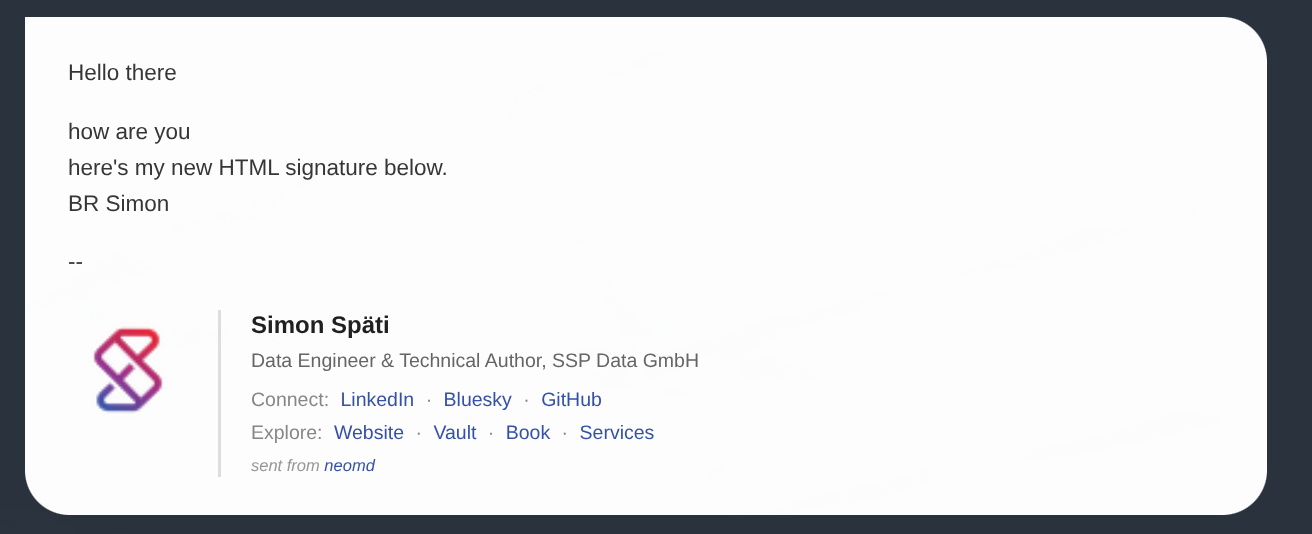
In the email as text:
Hello there

how are you
here's my new HTML signature below.
BR Simon

--
[html-signature]
Notes:
- Use inline styles only (no
<style>blocks or external CSS) for maximum email client compatibility - Host logo images externally (e.g.,
https://example.com/logo.png) so they display for recipients - The
textfield is backward compatible: if empty, neomd falls back to the legacysignaturefield - The
--separator is added automatically before the text signature
OAuth2 Authentication
Neomd supports OpenAuth2 authenticated accounts, you just need to add oauth2_client_id, oauth2_client_secret, oauth2_scopes and oauth2_issuer_url.
Note that when using oauth2 authentication, the password field is not required in the account configuration.
Issuer URL
By default, if an issuer URL is provided, i.e.: https://login.microsoftonline.com/common/v2.0 for Office265 accounts, neomd will search for the OpenID Connect discovery URL: /.well-known/openid-configuration resolving then the oauth2_token_url and oauth2_auth_url. These parameters can be provided manually as well.
Scopes
The scopes required depends on the provider and is better confirmed by your email provider. As an example, for Office365 acounts, the following scopes are required for IMAP: "https://outlook.office365.com/IMAP.AccessAsUser.All", "offline_access".